
Top up your balance
LanaChat is prepaid. You send crypto to your workspace's deposit address, the network confirms it, and the amount lands on your balance. Licences and LanaChat's share of your sales are then taken from that balance. Nothing is ever charged to a card or a wallet without a top-up you start yourself.
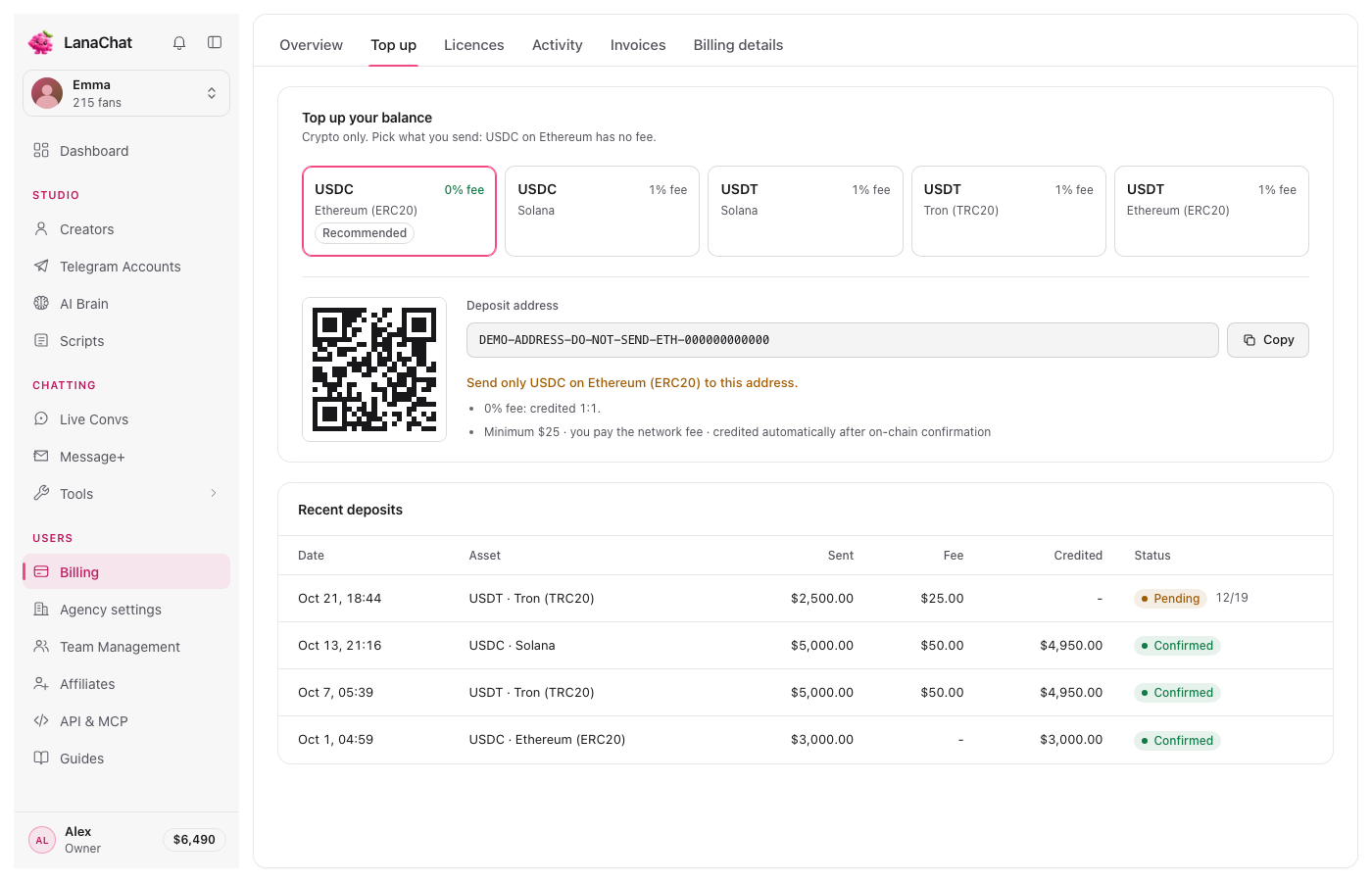
Before you send #
- Minimum: $25 per top-up.
- What you can send: USDC on Ethereum (ERC20), USDC on Solana, USDT on Solana, USDT on Tron (TRC20) or USDT on Ethereum (ERC20).
- Fees: USDC on Ethereum is credited 1:1, with 0% fee (it is marked Recommended). Every other choice has a 1% fee, as shown in the Top up tab: the deposit is converted to USDC (ERC20) when it arrives.
- Network fee: the blockchain fee of your transfer is paid by you, from your wallet.
Note Example: you send $1,000 in USDT on Tron. The 1% fee is $10, so $990 is credited to your balance. The same $1,000 in USDC on Ethereum credits $1,000.
Top up, step by step #
- Open Billing (Users, in the sidebar), then the Top up tab. You can also press Top up on the Overview, or click the balance pill next to your name at the bottom of the sidebar.
- Pick what you will send. The address, the QR code and the rules below them change with your choice.
- Press Copy next to the Deposit address (or scan the QR code from your wallet app).
- On Solana only, also press Copy next to Memo (required) and paste it in your wallet's memo field.
- Send the transfer from your wallet. Check the line in orange above the rules: send only that asset, on that network.
- Wait for the confirmation. The deposit appears in Recent deposits as Pending, with the confirmations counted (for example 12/19), then Confirmed. The balance is credited automatically at that moment.
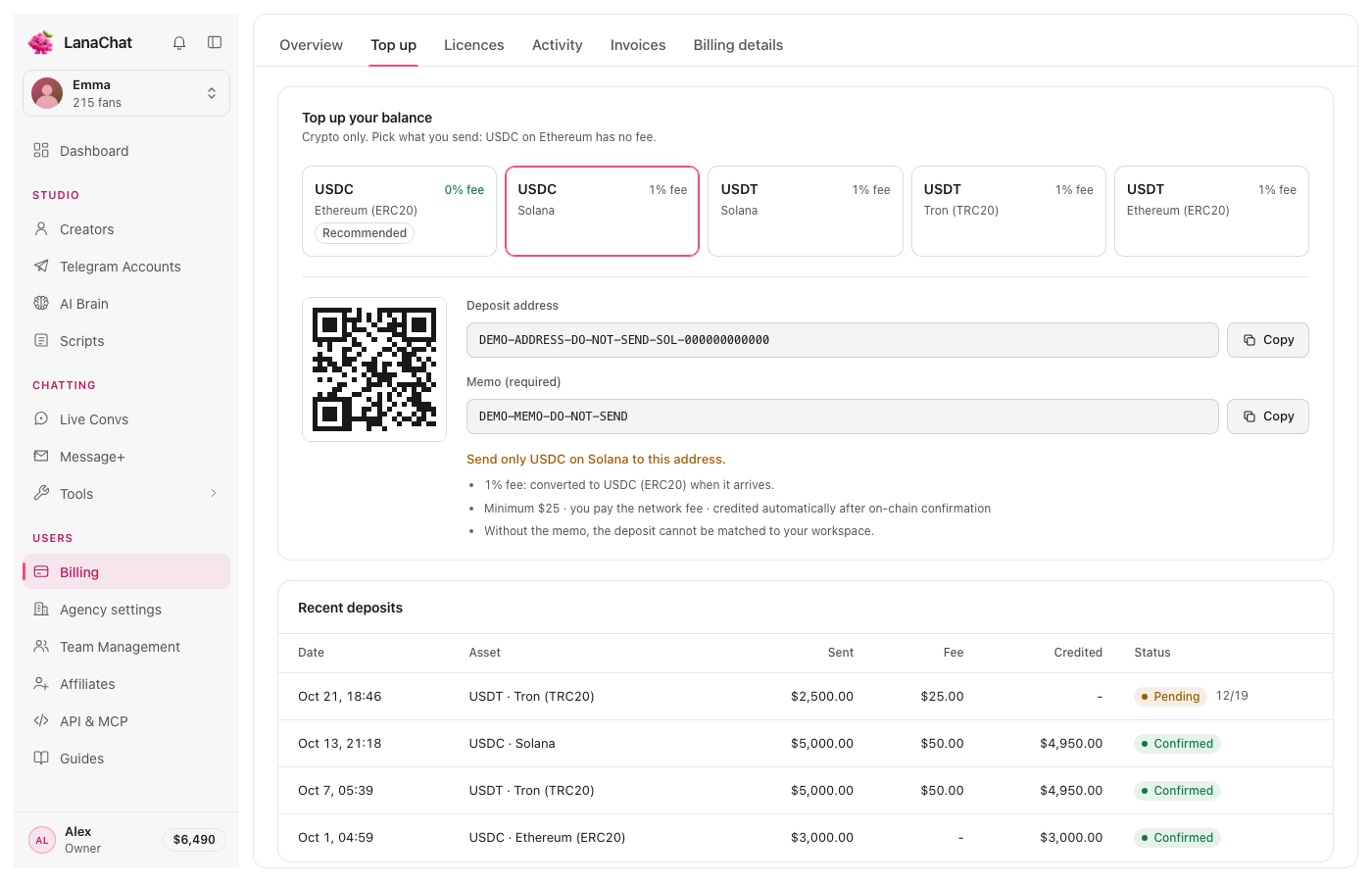
Warning On Solana, a deposit sent without the memo cannot be matched to your workspace. Always copy both the address and the memo.
Warning Send only the asset and network shown. A token sent on another network to this address is not credited automatically.
Recent deposits #
The table under the address lists your last deposits: Date, Asset, Sent, Fee, Credited and Status. Every confirmed deposit is also a line of type Deposit in Activity, with the balance after it.
Who can top up #
The balance pill and the Billing page are for the people your role lets in. Someone without billing access who clicks the pill sees "Only the agency owner can top up the balance". See Team Management.
Questions #
How long does a top-up take? #
As long as the network takes to confirm the transfer. Nothing is needed from you: the balance updates by itself once the deposit is Confirmed.
Can I get my money back if I stop? #
Unused balance can be refunded through support, on request within 30 days of the top-up. See Get your unused balance back.
How much should I keep on the balance? #
At least a week of commission plus your licence renewals. The Overview tells you how many days your balance covers at this month's pace. See When your balance runs low or hits $0.