
Tracking
Telegram tracking links with a Meta Pixel: how it works
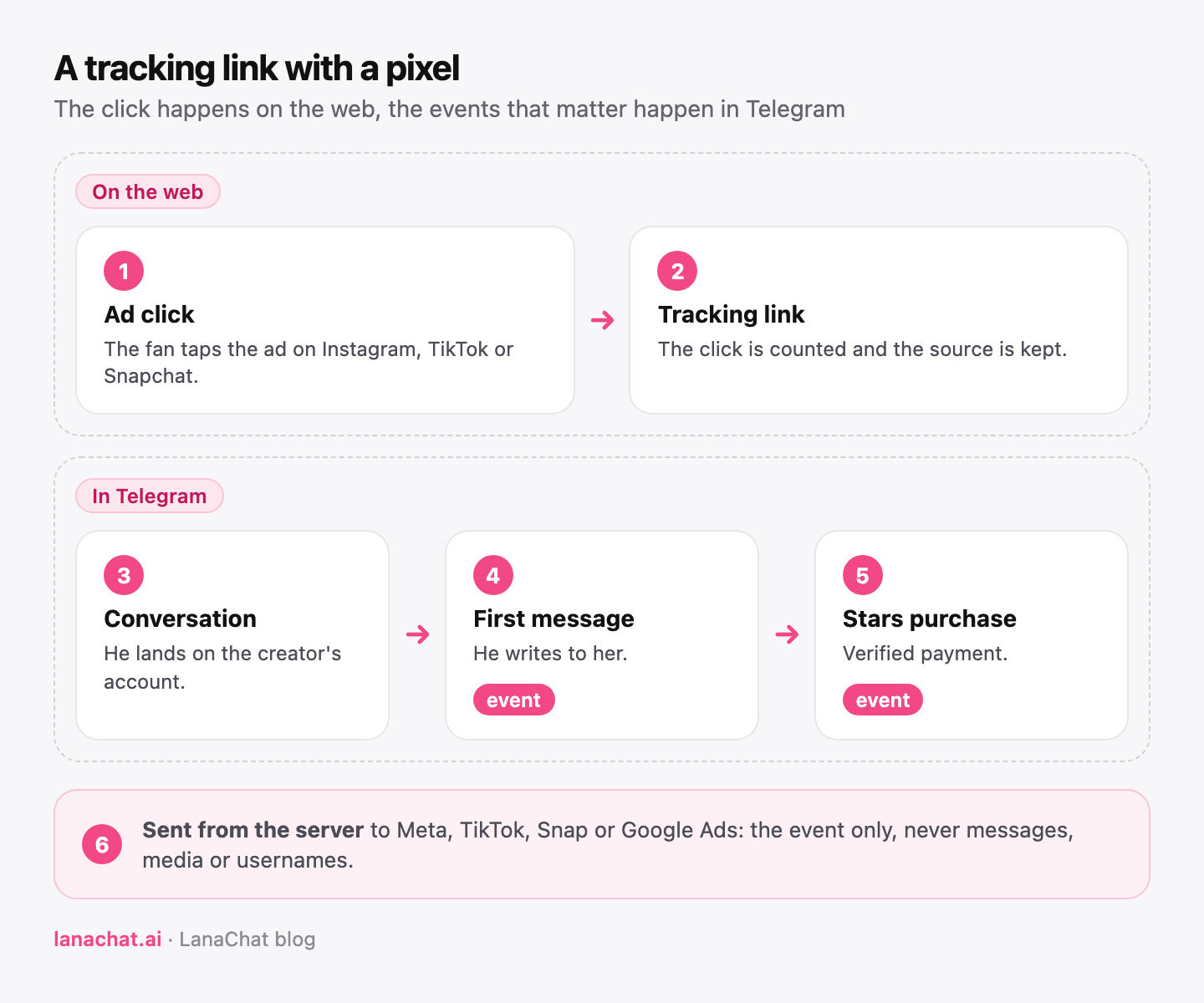
A Meta Pixel cannot run inside Telegram, because Telegram does not load your code in a private chat. The way to connect a Telegram funnel to Meta is a tracking link: the fan clicks a web link you own, lands in the creator's Telegram account, and the events that happen later in the chat (the first message, a confirmed purchase) are reported back to Meta from the server side. Set up that way, your ads learn from fans who talk and buy, not only from clicks.
This post explains the mechanics, what each event means, and how to set it up per ad without breaking your numbers.
Why can't a pixel sit inside Telegram?
On a website, a pixel is a small script that runs in the visitor's browser. It sees the page view, the add to cart, the purchase, because all of that happens on pages you control.
A Telegram funnel is different. The fan leaves the ad, opens Telegram, and from that point everything happens inside the Telegram app: the chat, the voice notes, the locked media, the payment in Stars. You cannot put a script in a private conversation. If you only send fans to a plain t.me link, Meta sees a click and then nothing.
That gap has a cost. Ad platforms optimize for the event you give them. If the only event is a click, the algorithm looks for people who click, which is not the same as people who start a conversation, and even less the same as people who pay.
How does a tracking link close the gap?
A tracking link sits between the ad and Telegram. It is a short web address on a domain you own, one per ad or per source, and it does three things:
- It counts the click and keeps the context of the ad (source, campaign, UTM parameters).
- It opens the conversation with the right Telegram account, or with the creator's pool of accounts.
- It ties what happens next to that click, so a first message or a purchase in the chat can be traced back to the link the fan came from.
Once a fan's later actions are tied to the link, they can be reported to the ad platform from a server. Meta calls this approach its Conversions API: events sent from a server rather than from the visitor's browser. TikTok describes the same idea with its Events API.
Which events should you send?
In LanaChat, a pixel connected to a link can send two events, alone or together:
- First Telegram message: the fan did not just click, he wrote to the creator. This is the event to use when a campaign is new and purchases are still rare, because the ad platform needs enough events to learn.
- Confirmed purchases: the fan paid for a locked media in Telegram Stars, and the payment is verified. This is the event that matches what the agency actually earns.
We recommend starting a new campaign on the first message, then moving the optimization to purchases once each ad set sends enough of them. Sending both from the start costs nothing and gives you the data for that switch.
A few rules keep the setup clean:
- Only new events after setup are sent. Connecting a pixel today does not replay last month's purchases.
- No content leaves the chat. Messages, media and usernames are never sent to the ad platform. The event says that something happened, not what was said.
- Read the pixel status. Each pixel shows Connected, Needs setup, Delivery failing or Not connected. If it reads Delivery failing, the ad platform is no longer receiving events: fix it before you trust the campaign.
How do you set it up for one ad?
Here is the setup for one Meta ad set, from start to finish.
- Create the link. In Tracking links, press New link, name it after the ad set (for example Emma Meta FR story test), pick the domain and the slug, set the traffic source to Meta and add the campaign name.
- Choose the destination. One Telegram account, or the creator's pool if the campaign may bring many fans at once.
- Connect the pixel. Pick your Meta pixel and the events to send: first message, confirmed purchases, or both.
- Put the link in the ad. Use the full tracking link as the ad's destination, never the bare t.me address, or the click will not be counted.
- Check the first events. Send yourself through the link from a test account, write a message, and check that the pixel status stays Connected.
The tracking links feature shows the whole flow, and the tracking guide lists every field of the link window.
Why use your own domain for the links?
Ad platforms and fans both read the link. A link on a subdomain you own, such as go.youragency.com, looks consistent across all your ads, and you can move it between tools without changing every ad. In LanaChat you add the subdomain, copy the two DNS records, press Check DNS, and the SSL certificate is issued once the domain is verified. The LanaChat domain stays available if you do not want to manage DNS.
How are purchases attributed to the ad?
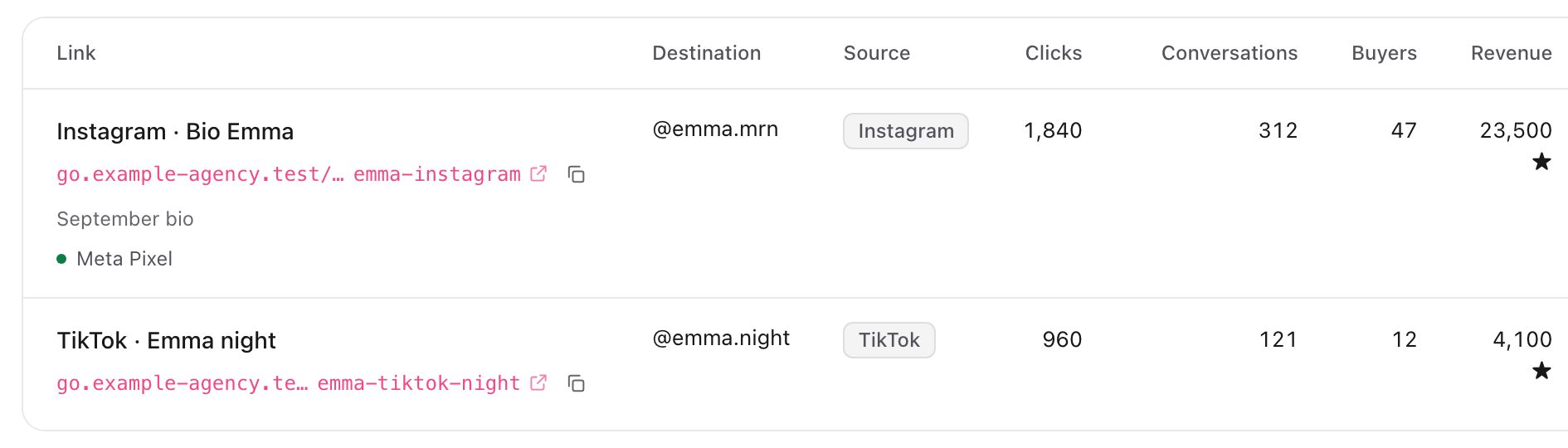
A fan belongs to the first link he clicked. If he first came from a Meta story and later clicked a TikTok link, his purchases stay with the Meta story. Purchases count when they are verified Telegram Stars purchases.
First-touch is simple and stable, and it is the same rule for every source, so you can compare them fairly. It will not always match what Meta reports in Ads Manager, because Meta has its own attribution windows. Use the tracking link numbers as your record of revenue, and Ads Manager for delivery and cost. Our post on how to track which link brings Telegram sales covers the attribution side and the numbers to read in more detail.
Common mistakes
- One link for every ad. You get one pixel and one number for the whole budget, and no way to cut the ad that does not sell.
- Optimizing on clicks. The ad platform finds clickers. Send at least the first message event.
- Switching to purchases too early. With a handful of purchases per week, the algorithm has too little to learn from. Start on first messages.
- Ignoring Delivery failing. The ads keep running, but the platform stops receiving events and drifts back to clicks.
- Reusing an old link for a new ad. The two ads then share one set of numbers. Create a new link, and archive the old one: archiving stops new clicks, and the attribution and revenue already recorded stay in your reports.
FAQ
Can I install a Meta Pixel inside a Telegram chat?
No. Telegram does not run your code inside a private conversation. The pixel event is sent from the server side when the fan writes or pays, through the tracking link he clicked.
Which ad platforms can a LanaChat link report to?
Meta, TikTok, Snap and Google Ads. Each link can have its own pixel.
Are fan messages sent to Meta?
No. Messages, media and usernames are never sent. Only the event itself (a first message or a confirmed purchase) is reported.
Will past purchases be sent when I connect a pixel?
No. Only new events after the pixel is set up are sent.
Why do my Ads Manager numbers differ from LanaChat?
Meta uses its own attribution windows. LanaChat attributes each fan to the first link he clicked, with verified Telegram Stars purchases. Compare trends, not exact totals.